Connect Third-Party and Self-Hosted Providers
Libre WebUI 0.16.0 adds a focused Provider connections workspace inside Settings > Plugins. Use it to activate a bundled provider, point a compatible plugin at another API, inspect the effective model catalog, or connect a self-hosted gateway on a trusted network.
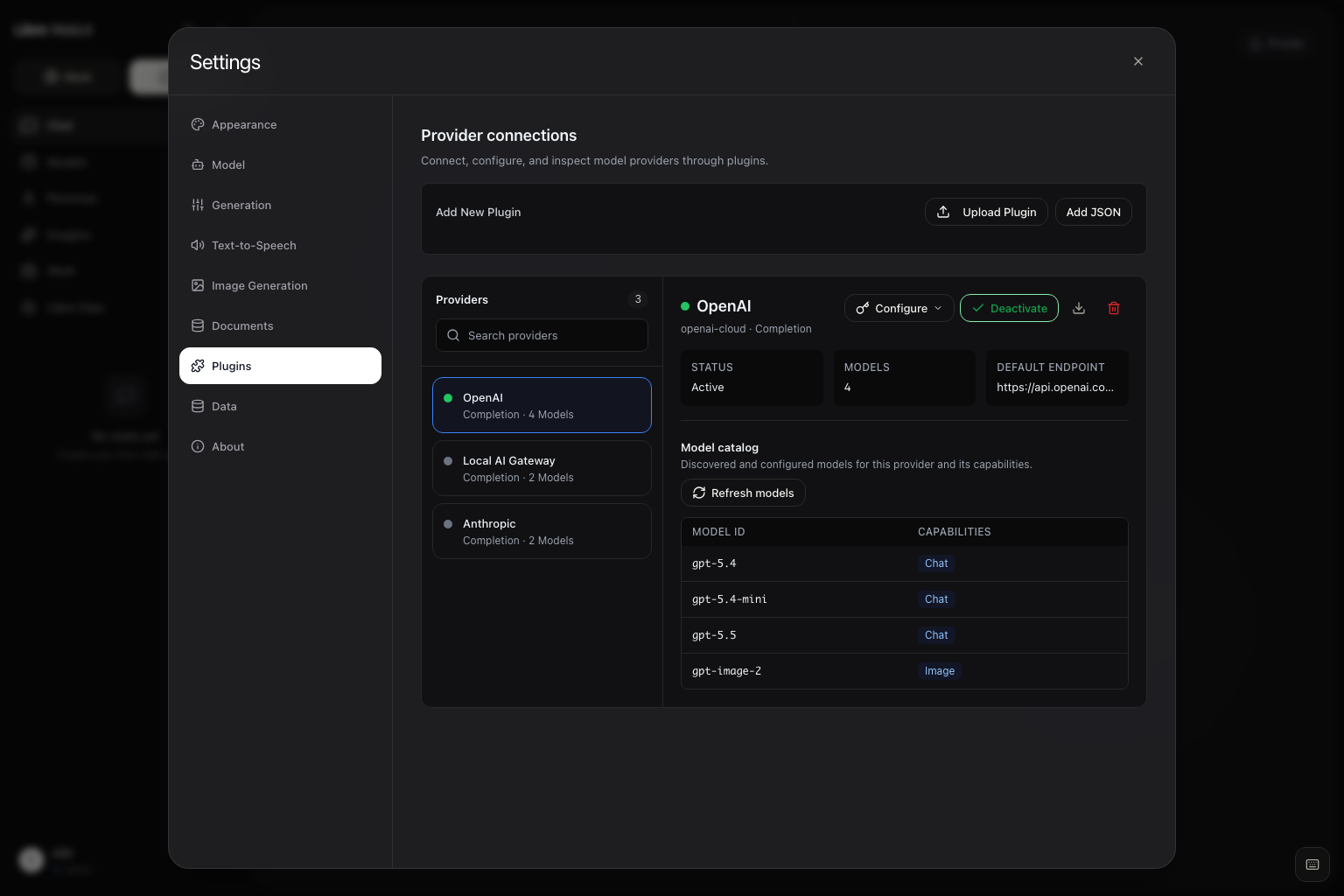
Libre WebUI currently ships support for these provider wire formats:
- OpenAI Chat Completions;
- OpenAI Responses;
- Anthropic Messages; and
- Google Gemini contents and function calling.
The bundled Anthropic and Gemini definitions use dedicated adapters selected by their provider identities. A newly imported provider uses OpenAI Chat Completions or OpenAI Responses semantics; pointing it at an Anthropic- or Gemini-compatible API does not select those bundled adapters. A provider with another request, streaming, tool-call, or response shape needs a backend adapter. Plugin JSON describes routing and configuration; it does not translate an unrelated protocol.
Open Provider Connections
- Sign in and open Settings > Plugins.
- Search the provider list in the left pane.
- Select a provider to review its active state and effective model catalog.
- Activate the provider for your account.
- Select Configure only when you need to save a credential or override a connection setting.
Provider configuration is closed by default. Connection settings appear first for administrators, while sampling controls such as temperature and token limits remain under the separately collapsed Advanced parameters section. Inherited defaults appear as hints rather than pre-filled account overrides.
Plugin definitions are shared instance configuration, so only administrators can import, install, update, or delete them. Each authenticated user controls their own activation state, credential, and allowed generation settings.
Add a Connection Quickly
Settings > Connections is a shorter path for the common case: one OpenAI-compatible endpoint, one API key. Administrators see a card for the local Ollama runtime with its health and version, a list of the existing OpenAI-compatible connections, and a small form to add another.
Adding a connection takes a display name, the full chat completions URL, and an optional API key. Libre WebUI derives the connection ID from the name, installs the provider definition, stores the key server-side, activates the connection, and asks the endpoint which models it serves. The discovered models replace the placeholder catalog and appear in the chat model picker.
Each row carries the endpoint, the model count, whether a key is stored, an active toggle, a model refresh, and a delete. Anything beyond this — response API modes, base URL overrides, per-capability catalogs, generation parameter policy — still lives in the fuller Settings > Plugins workspace described above.
Codex (ChatGPT Sign-In)
The bundled Codex (ChatGPT) provider needs no API key. When the server has
a Codex CLI sign-in (codex login as the server's operating-system user), the
provider appears to administrators, offering GPT-6 Astra, GPT-6.1 Sol
(gpt-6.1-sol), GPT-6 Sol, GPT-6 Luna, GPT-5.6 Sol, Terra, Luna, GPT-5.5, and
GPT-5.3 Codex Spark through the ChatGPT session, subject to the signed-in
account's model access. Access tokens are read from the CLI's own auth.json,
refreshed through the same OAuth client the CLI uses, and written back so the
CLI keeps working; token values never appear in logs.
Because the requests are made by the backend — never from inside a task
container — these models also power Work with the normal sandboxed tool loop.
The provider is administrator-only since every call spends the server owner's
ChatGPT subscription. Hide it entirely with CODEX_OAUTH_MODELS_ENABLED=false,
or point at a different sign-in with CODEX_HOME.
Amazon Bedrock
The bundled Amazon Bedrock provider takes a Bedrock API key, either
short-term or long-term, from the Amazon Bedrock console. Save it in the
provider's settings or set AWS_BEARER_TOKEN_BEDROCK on the server. It needs
no AWS SDK, access key pair, or IAM signing.
Libre WebUI talks to the Region's bedrock-mantle.<region>.api.aws endpoint and
lists every model the account can call there, the same way OpenRouter lists its
catalog. Models the account cannot use yet, for example because of its data
retention mode, are left out of the list. Pick the Region with the Region
setting. It only switches between Bedrock hosts, so the key can never be sent
anywhere else, and changing it keeps the saved key.
Claude models (anthropic.*) run through Bedrock's Anthropic Messages API, so
thinking, tools, and token ceilings behave as they do with the Anthropic
provider. Every other model uses Chat Completions. Bedrock serves some families
on a second Chat Completions route; Libre WebUI tries that route when Bedrock
says a model lives there and remembers it. Chat, Work, and the Strands engine
can all use these models, and usage appears under the provider in analytics.
In commercial Regions, AWS serves Claude Haiku 5.5 and Claude Sonnet 5.5 only
on bedrock-runtime, through cross-Region inference profiles, so Mantle's model
list never includes them. The catalog adds
global.anthropic.claude-haiku-5-5 and global.anthropic.claude-sonnet-5-5,
and any Claude inference profile ID (global., us., eu., au., or jp.)
is sent with the same API key to the selected Region's
bedrock-runtime.<region>.amazonaws.com/anthropic/v1/messages. The key still
only goes to that Region's two Bedrock hosts. Your account still needs access
to the model in Amazon Bedrock.
Choose a Bundled or Imported Provider
Libre WebUI includes definitions for OpenAI, Anthropic, Gemini, Groq, Mistral, DeepSeek, Meta, Amazon Bedrock, OpenRouter, Kimi Code by Moonshot AI, Hugging Face, GitHub Models, local MLX LM, and other model or media services. Start with a bundled entry when its protocol and authentication contract match the service you want to use.
For another compatible service, an administrator can import a plugin JSON definition. This minimal example describes an OpenAI-compatible gateway:
{
  "id": "private-ai-gateway",
  "name": "Private AI Gateway",
  "type": "completion",
  "endpoint": "http://ai-gateway:8080/v1/chat/completions",
  "api_mode": "chat_completions",
  "auth": {
    "header": "Authorization",
    "prefix": "Bearer ",
    "key_env": "PRIVATE_AI_GATEWAY_API_KEY"
  },
  "model_map": ["gateway-chat"]
}
Import the file from Settings > Plugins, activate it, and save the API key
for the account that will use the connection. Add connection variables to the
definition when administrators need editable Base URL, path, discovery, or
capability-specific endpoint fields. The bundled
plugins/openai.json
is a complete example.
For an intentionally authless gateway on a trusted network, set both
auth.header and auth.key_env to empty strings and omit auth.prefix. Libre
WebUI then does not require or send an API key for that plugin.
Choose Chat Completions or Responses
OpenAI-compatible completion plugins can use either API mode:
| API mode | Default request path | Typical request field |
|---|---|---|
chat_completions | /chat/completions | messages |
responses | /responses | input |
The bundled OpenAI provider exposes API Mode in its configuration. Libre WebUI maps completed and streamed Responses output back into Chat and Work, including bounded replay state for reasoning and tool calls.
Changing the mode affects the default operation path. It does not change the protocol spoken by the upstream server, so select Responses only when that server implements compatible Responses request and event shapes.
Configure a Base URL or Full Endpoint
Libre WebUI resolves a completion route in this order:
- A non-default full
endpointoverride. base_urlplus an optionalapi_path.- The endpoint declared by the plugin definition.
Use Base URL for the API root:
https://gateway.example/v1
With no custom path, Chat Completions mode sends requests to:
https://gateway.example/v1/chat/completions
Responses mode instead sends them to:
https://gateway.example/v1/responses
Use API Path when the provider exposes a compatible operation at another path relative to that root. Use Legacy Full Endpoint only when you need to provide the complete operation URL; a genuine full endpoint takes precedence over Base URL and API Path.
Known /chat/completions, /completions, and /responses endpoint suffixes
also identify the request semantics. A custom, unrecognized operation path
keeps the explicitly selected API mode.
After a route or API-key change, save the provider again before testing Chat. When the plugin declares authentication, a custom connection route requires a credential saved by the same account. An intentionally authless plugin can leave both authentication fields empty. Libre WebUI does not send an operator-managed environment key to a user-defined destination; environment fallback is reserved for the trusted bundled route.
Discover or Maintain Model IDs
Select an active chat provider and use Refresh models to run discovery. Libre WebUI reloads both the selected provider's catalog and Chat's model list.
Discovery also runs without being asked: an active provider's catalog is
rediscovered when it is missing or has aged past
PLUGIN_MODEL_DISCOVERY_TTL_MS, so the models you see follow the provider
rather than the moment you activated it. Refresh models forces a check
immediately and reports what happened:
| Result | Meaning |
|---|---|
| Catalog updated | The provider answered and its model list differs from the stored one |
| Catalog already up to date | The provider answered with the same list |
| API key needed | No usable key, so no request was made — the previous catalog is still shown |
| Catalog could not be loaded | The provider was unreachable or returned nothing usable |
A key set only in the environment is not used for a provider that runs an installed definition instead of the bundled one; the message says so when that applies. Speech, image, and embedding models found in a provider's catalog are listed here with their capability labels, but are kept out of the chat model picker.
For an OpenAI-compatible route, discovery chooses the model-list URL as follows:
- a route ending in
/modelsis used as-is; - a known operation suffix such as
/chat/completions,/completions,/responses,/embeddings, or/messagesis replaced with/models; and - otherwise,
/modelsis appended to the route.
For example, both of these completion routes derive the same discovery URL:
https://gateway.example/v1/chat/completions
https://gateway.example/v1/responses

-> https://gateway.example/v1/models
When derivation cannot produce the correct full URL, expose
models_endpoint in the plugin's variables array:
{
  "name": "models_endpoint",
  "type": "string",
  "label": "Models Endpoint",
  "default": "https://gateway.example/v1/models"
}
The inherited default or administrator-saved value takes precedence over the
derived address. A top-level models_endpoint manifest property is not read.
Discovery expects an OpenAI-compatible response with model objects in a data
array:
{
  "data": [{ "id": "gateway-chat" }, { "id": "gateway-code" }]
}
Discovered IDs are stored per user and do not rewrite the shared plugin file.
If the provider does not implement compatible discovery, maintain fallback
model IDs in the plugin JSON model_map. The catalog in Provider connections
is read-only; capability labels describe which plugin route lists a model and
are not health checks.
Model IDs are not globally unique. Chat stores the raw model ID together with its exact Ollama or plugin provider identity, so an Ollama model and multiple plugins can safely expose the same name. If the saved provider becomes unavailable, Libre WebUI shows that selection as unavailable instead of silently routing the request to another provider.
Configure Image Generation Separately
The bundled OpenAI provider exposes image generation through
https://api.openai.com/v1/images/generations and currently defaults new
configurations to gpt-image-2. Older GPT Image IDs remain in its fallback
catalog for compatible existing deployments.
Chat and image routes are intentionally isolated. A custom Chat Base URL does
not automatically receive image requests. Leave image_endpoint blank to use
the image endpoint declared by the plugin, or set it to the complete compatible
Image API operation URL when your provider supplies one.
Image choices are provider-qualified, just like Chat choices. If two active plugins expose the same image model ID, Libre WebUI sends the request only to the provider selected in the image panel.
Connect an HTTP Gateway Safely
Provider endpoints can use absolute HTTP or HTTPS URLs. HTTP is useful for a self-hosted gateway on a trusted LAN, Tailscale network, or private container network, but it sends API keys, prompts, tool results, and generated content without transport encryption. Prefer HTTPS whenever the route crosses a network boundary or the gateway supports TLS.
Requests originate from the Libre WebUI backend, not from the browser. Choose an address that is reachable from that backend:
| Backend location | Example provider root |
|---|---|
| Native process, same machine | http://127.0.0.1:8081/v1 |
| Docker Compose service | http://ai-gateway:8080/v1 |
| Container to supported host | http://host.docker.internal:8081/v1 |
| Trusted LAN or Tailscale host | http://192.168.1.20:8081/v1 |
Inside a container, localhost identifies the Libre WebUI container itself.
It does not identify another Compose service or automatically reach the host.
Libre WebUI accepts only HTTP and HTTPS provider URLs, validates the final destination before selecting a credential, and does not follow redirects for provider or discovery requests. Configure the final operation URL directly.
Verify the Gateway Before Activating It
Test model discovery from the machine or container that runs the Libre WebUI backend:
curl http://ai-gateway:8080/v1/models \
  -H 'Authorization: Bearer YOUR_GATEWAY_KEY'
Then test the operation matching the selected API mode.
Chat Completions:
curl http://ai-gateway:8080/v1/chat/completions \
  -H 'Authorization: Bearer YOUR_GATEWAY_KEY' \
  -H 'Content-Type: application/json' \
  -d '{
    "model": "gateway-chat",
    "messages": [{"role": "user", "content": "Reply with: ready"}],
    "stream": false
  }'
Responses:
curl http://ai-gateway:8080/v1/responses \
  -H 'Authorization: Bearer YOUR_GATEWAY_KEY' \
  -H 'Content-Type: application/json' \
  -d '{
    "model": "gateway-chat",
    "input": "Reply with: ready",
    "store": false
  }'
After both calls work, configure the same route, mode, credential, and model ID in Provider connections. Activate the provider, select Refresh models, and then choose its provider-qualified model in Chat. Work can also use it when the model reliably supports tool calling.
Troubleshooting
| Symptom | Check |
|---|---|
| Requests still reach the bundled endpoint | Remove a stale full endpoint override, then save the intended Base URL and API Path. |
| The provider receives the wrong payload | Match API Mode to the upstream Chat Completions or Responses protocol and verify the final suffix. |
| Refresh models returns no IDs | Test /models, verify the data[].id shape, expose/configure the models_endpoint variable, or maintain model_map. |
| A previous model remains after a route edit | Save the connection change; Libre WebUI clears that user's obsolete discovered catalog before refreshing. |
| The API key is reported missing | Save a per-user credential for the custom route; bundled environment fallback does not follow overrides. |
| A Docker deployment cannot reach localhost | Use the gateway's Compose service name, a supported host alias, or a reachable private-network address. |
| Chat works but image generation does not | Configure the separate complete image_endpoint and select a model exposed by that image capability. |
| Chat works but Work rejects the model | Confirm the model supports compatible tool calls; ordinary text completion is not sufficient. |
| The provider returns a redirect | Configure the final validated URL directly; Libre WebUI intentionally does not follow provider redirects. |
For detailed routing, credential, replay-state, and authorization behavior, read Plugins. For deployment-specific failures, see Troubleshooting.
Community Acknowledgment
This guide and Libre WebUI 0.16.0's Provider connections experience were shaped by ZhengJin (@fangzhengjin), whose detailed third-party-provider feedback and AI-assisted UX concept in #163 helped define the workflow.